Showing posts with label ILife. Show all posts

Wednesday, January 12, 2011

Apple’s Mac App Store Opens for Business

App StoreImage via WikipediaApple’s Mac App Store Opens for Business
http://www.apple.com/pr/library/2011/01/06macappstore.html

Apple’s Mac App Store Opens for Business

The Mac App Store brings the revolutionary App Store experience to the Mac, so you can find great new apps, buy them using your iTunes® account, download and install them in just one step.

The Mac App Store is available for Snow Leopard® users through Software Update as part of Mac OS® X v10.6.6.

"With more than 1,000 apps, the Mac App Store is off to a great start," said Steve Jobs, Apple's CEO. "We think users are going to love this innovative new way to discover and buy their favorite apps."

The Mac App Store offers apps in Education, Games, Graphics & Design, Lifestyle, Productivity, Utilities and other categories.

Users can browse new and noteworthy apps, find out what's hot, see staff favorites, search categories and look up top charts for paid and free apps, as well as user ratings and reviews.

Entirely new apps, as well as current Mac favorites, are available from developers such as Autodesk, Ancestry.com and Boinx.

"We're delighted to bring our professional-grade paint and drawing app, Autodesk SketchBook Pro, to the Mac App Store on its first day of launch," said Carl Bass, Autodesk's CEO. "We've seen tremendous success on the Mac, iPhone and iPad with multiple apps.

We're excited to offer SketchBook Pro on the Mac App Store so artists can easily create everything from quick sketches to high-quality artwork right on their Macs."

"By offering the Ancestry.com Family Tree Maker app on the Mac App Store, we're making it even easier for people to discover and access their family history," said Tim Sullivan, Ancestry.com's CEO. "The Mac App Store will drive a new generation of innovation on the Mac platform."

"We're thrilled to have our award-winning animation, video production and photography software available on the new Mac App Store," said Oliver Breidenbach, Boinx Software's CEO. "The Mac App Store makes it easier than ever for consumers to access all the innovative software designed for the Mac."

To get the Mac App Store, download the Mac OS X v10.6.6 Software Update or visit www.apple.com/mac/app-store.

Apple designs Macs, the best personal computers in the world, along with OS X, iLife, iWork, and professional software.

Apple leads the digital music revolution with its iPods and iTunes online store.

Apple is reinventing the mobile phone with its revolutionary iPhone and App Store, and has recently introduced its magical iPad which is defining the future of mobile media and computing devices.
To get the Mac App Store, download the Mac OS X v10.6.6 Software Update or visit www.apple.com/mac/app-store. To find out more about developing for the Mac App Store visit developer.apple.com/programs/mac.

Apple designs Macs, the best personal computers in the world, along with OS X, iLife, iWork, and professional software. Apple leads the digital music revolution with its iPods and iTunes online store. Apple is reinventing the mobile phone with its revolutionary iPhone and App Store, and has recently introduced its magical iPad which is defining the future of mobile media and computing devices.
Enhanced by Zemanta

Friday, January 7, 2011

Importing iPhone clips into iMovie

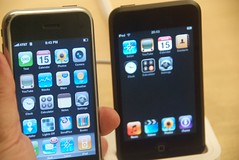
My hacked (for apps) iPhone & an iPod Touch at...Image by Steve Rhodes via Flickr

Importing iPhone clips into iMovie

Just a basic understanding of how iPhone movies are treated by a Mac and new and older versions of iPhoto and iMovie.
Shoot a movie with your iPhone or 4G iPod touch and then attach the device to your Mac via the sync cable.
Check iPhoto's Library pane and you'll see your iPhone listed as a camera.
Again, by default, its contents will appear in iPhoto's main window.

Movies

Prior to iLife '11

Movies you've captured with your iPhone will appear with a small camcorder icon in their bottom left corner.
Select those movies and click the Import Selected button and the movies will be imported to your iPhoto library.
When you launch iMovie it will likely ask if you'd like to update thumbnails for videos in your iPhoto library.
Let it do that by clicking the Now button. When iMovie's done you should see the clips you've recently imported into iPhoto. This describes how it was done prior to iLife '11.

With the latest version of iMovie - iLife 11

If you have the latest version of iMovie you have a more direct route. iPhoto will still launch and you can still import your iPhone and 4G iPod touch movies into it, but you can also import movies directly into iMovie '11.
Launch iMovie '11, attach your iPhone or 4G iPod touch to your Mac, and click the Camcorder icon that appears just above the Event Library.
In a short while iMovie will recognize the iPhone or iPod touch and produce an Import From window that includes all the videos on the attached device.
At this point, import the clips just as you would from any compatible camera or camcorder.
Select the clips you want and click the Import Selected or Import All button.
In the sheet that subsequently appears, choose the event you want to place the clips in (or create a new event).
If you like, enable the After Import Analyze For option and choose Stabilization and People, Stabilization, or People from the pop-up menu.

Concepts:
movies, iPhone, iMovie, iPhoto, clips, iPod touch, launch iMovie, importing, camcorder icon, Mac, Stabilization, videos, window, camera, attach.


Enhanced by Zemanta

Thursday, August 27, 2009

Bloggers: Mac OS X Snow Leopard could arrive in two weeks | Mac OS X

Snow LeopardImage by Dekuwa via Flickr


Source: Macworld

Apple’s upcoming operating system, Mac OS X Snow Leopard, could arrive earlier than the expected September launch date. Multiple sources are reporting that Snow Leopard has now been designated “Gold Master” status, which means the OS is ready to ship to users.

Mac OS X 10.6 Snow Leopard could be on sale as early as Friday, August 28 according to reports from Daring Fireball's John Gruber. Apple also released on Wednesday a final update for OS X Leopard (10.5.8), which could indicate that the next version of the OS is on its way.

Now with a “Golden Master” status, Snow Leopard is reportedly already on its way to manufacturing, where it will be recorded onto DVDs, according to a report from AppleInsider. The site also reports this final build is on its way to Apple technicians and support staff.

Amazon is already taking pre-orders for Snow Leopard and on the sales pages mentions that an “official release date has not been announced by Apple, though they have indicated this product will be released sometime in September.” Back in June, Apple said that Snow Leopard will arrive in September, but they haven’t mentioned any specific launch date.


Mac OS X 10.6 Snow Leopard’s pricing is set at $29.99 for a single-user license and a 5-user license (Family Pack) will cost $49. A Mac Box Set, which includes Snow Leopard, iLife and iWork (productivity suite), is priced at $169 for a single-user license and at $229 for a 5-user license.

For more information about what's new in OS X 10.6, my colleague Nick Mediati has a list of 5 things you should know about Snow Leopard.


by Daniel Ionescu, PC World

Editor’s Note: The following article is reprinted from the Today @ PC World blog at PCWorld.com.


Reblog this post [with Zemanta]

Wednesday, August 5, 2009

How Switching To a Mac Can Save You Countless Productive Hours

A common Microsoft Windows logo (1992-2000)Image via Wikipedia


Source: Computer Repair And PC Repair London

Whether you are an expert computer user or not, you have probably been burned by your computer in the past. For some a computer virus could have wiped out your hard drive, or completely taken control of your web browser. For others, you might have been running an application only to have it crash and lose your data. So what is the solution?

There is a solution to many of the common computer problems: switch to an Apple computer. Although Apple and Microsoft have always competed for the personal computer marketshare, today things have changed. Where once someone with a Windows-based computer would never think twice of switching over, now people are switching in droves.

Why the sudden shift? There are many factors for this change. First off, the Macintosh operating system has been redesigned from the ground up and is now a more stable and effective operating system. With Mac OS X, users have a lot less to worry about: no viruses, no trojans, and no crashes. What more could a user want? For more please visit computer training

logoImage via Wikipedia


Apple delivers more: a seamless integration between hardware and software. When you buy a PC and install Windows, chances are that you are installing the operating system on a set of hardware that was never really fully tested together. Different combinations of plug and play hardware are what causes Windows to crash time and time again.

On the other hand, with an Apple computer, you get the operating system that was tested with the hardware ahead of time. Did you ever wonder why Apple sells the hardware with the software? It's because it allows the developers to test their software on the different hardware configurations before shipping the product. PCs come in too many varieties to be tested fully. For more please visit computer training

Plus, Apple delivers all the applications you need to get your work done, and have fun doing it. On a Windows machine, you get the basic Microsoft Office suite of applications. Now, you can get the same suite of applications for your Mac as well.

Yet, Apple offers applications that you can't get on Windows: the iLife set of applications. These programs make your life easier because they organize and import all your digital photos, they play your music, they let you import home movies, and create DVDs right from your computer.

What's more is that Apple does most of the work in the background, and leaves you to focus on the most important decisions. Developers and computer wizards used to pride themselves on knowing the internals of their windows machines. Today that's changing, as people realize they have better things to do than spend all their time at a computer terminal, when they could go out and enjoy life.

That's exactly what switching to a Mac can do for your productivity. Your computer will let you be as productive as you can, by getting out of your way. So that you can get back to living your life to the fullest! For more please visit computer training courses

Tags: fast pc repair, computer repair, computer repair london, data disk recovery"

Reblog this post [with Zemanta]